GamePigeon Checkers: Rules, Tips and a Free Solver
GamePigeon checkers is the checkers game in GamePigeon, the iMessage games app. By default you have to jump when you can, much like American checkers, and GamePigeon also offers a mode where jumps are optional. This page compares its rules with the checkers on this site, gives tips for winning, and shows how to check a move in our free solver.
Checkers Online is not affiliated with GamePigeon or its developer.
Find the best move in the solver →What is GamePigeon checkers?
GamePigeon is a free set of two-player games that runs inside Apple's Messages app. Vitalii Zlotskii released it on 13 September 2016. It works on iPhone, iPad and iPod touch, and the App Store lists it as "Only for iMessage", so there is no official Android version.
Checkers is one of more than 20 games in the app, next to Chess, 8-Ball, Cup Pong, Word Hunt and others. You start a game in a Messages conversation and take turns with your friend from there.
What rules does GamePigeon checkers use?
GamePigeon checkers follows the American checkers rules (also called English draughts), according to third-party guides: an 8×8 board, 12 pieces a side, forced jumps, multi-jumps that must carry on, and kings that move backward. GamePigeon itself publishes no rulebook, so the table says where each rule comes from and where we found nothing.
| Rule | GamePigeon checkers | Checkers on this site |
|---|---|---|
| Board and pieces | 8×8 board, 12 pieces a side (third-party guide) | 8×8 board, 12 pieces a side |
| Do you have to jump? | Yes, in the standard game (GamePigeon's own account) | Yes, always |
| Optional-jump mode | Yes, picked when you start a new game (GamePigeon's own account) | No |
| More than one capture on offer | You choose which one (third-party guide) | You choose which one |
| Multi-jumps | Must carry on to the end (third-party guide) | Must carry on to the end |
| Men capture backward | Not documented | No, men move and jump forward only |
| Kings | Move and jump forward and backward; distance not documented | Move and jump one square in any diagonal direction |
| Who moves first | Not documented | Black |
| Draws | Not documented | Threefold repetition, or 40 moves each with no capture or man move |
For the rows marked "not documented", the app still has a rule. We just could not confirm it from GamePigeon or a reliable source. Try it in a game before you count on it. The full rules for the site's version are on the American checkers rules page.
Do you have to jump in GamePigeon checkers?
Yes, in the standard game. When a user asked about forced jumps in 2017, GamePigeon's account on X replied that forced jumps are the official rules, and that there is a separate mode, picked when you start a new game of checkers, where jumps are optional. That is the only rule GamePigeon has stated in public that we could find, and we could not check whether the mode is still in the app today.
If the game won't let you make a move you want, a jump is probably on offer somewhere on the board, and you have to take it. Our guide to jumping in checkers covers forced jumps, double jumps and what happens on the king row.
How do you win at GamePigeon checkers?
You win by taking all of your friend's pieces or leaving them with no legal move. In the forced-jump game, these habits help most.
- Check every jump before you move. Captures are compulsory, so most games are lost by leaving a piece where it can be taken for nothing. Before each move, ask whether it lets your friend jump, and whether you can jump straight back.
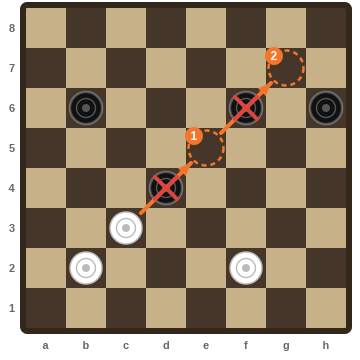
- Use forced jumps against them. Offer one piece so that the jump your friend must take sets up a double jump for you. That is a two-for-one shot, and it only works because they have no choice.
- Keep your back row. Your back-row men guard the squares an enemy man needs to become a king. Move them only for a clear gain.
- Play toward the center. A central man has two squares to move to, an edge man has one. Over a game the side with more moves keeps finding good ones.
- Trade when you are ahead. Once you have an extra piece, even swaps make your lead count for more. When you are behind, avoid them.
In the optional-jump mode, shots stop working, because your friend can just decline the piece you offer. There, the back row, the center and careful trades carry more of the game. The complete checkers strategy guide goes into each idea, and 5 ways to win at checkers fast covers quick tactics.
How do you use a solver for a GamePigeon checkers game?
To check a GamePigeon move, rebuild the position in the checkers solver with American checkers selected and press Find best move. It does not read screenshots, so you place the pieces by hand.
- Open the solver with American checkers selected.
- Press Clear board, then pick a piece (black or white, man or king) and tap the dark squares to copy your game. Your colours in GamePigeon may differ, so use black for one side and white for the other.
- Set Side to move to the side whose turn it is.
- Press Find best move. The move is highlighted on the board and written out under it.
The solver looks up to six moves ahead for each side, using the same engine as the Hard computer opponent on this site. It always treats jumps as forced. If you started your GamePigeon game in the optional-jump mode, its answers will not always fit your game.
It works best for reviewing a game after it ends. For practice against the computer, play checkers free in your browser, or try the daily checkers puzzle.
Frequently Asked Questions
What is GamePigeon checkers?
GamePigeon checkers is the checkers game inside GamePigeon, a free collection of two-player games you play with a friend in Apple's Messages app on iPhone and iPad. You and a friend take turns in a Messages conversation.
Do you have to jump in GamePigeon checkers?
Yes, in the standard game. GamePigeon's own account has said that forced jumps are the official rules, and that a separate mode, chosen when you start a new game of checkers, makes jumps optional.
Can kings move backward in GamePigeon checkers?
Yes. Kings move and jump forward and backward. GamePigeon does not say how far a king can move. Third-party guides say the game follows American checkers, where a king moves one square at a time.
Is there a GamePigeon checkers solver?
GamePigeon has no solver of its own. You can copy a position from your game into the free checkers solver on this site, with American checkers selected, and it suggests the best next move. It assumes jumps are forced, so its advice does not fit the optional-jump mode.
Can you play GamePigeon checkers on Android?
Not from the developer. GamePigeon is listed on the App Store as only for iMessage, on iPhone, iPad and iPod touch. You can play the same style of checkers in any browser on this site.
Is this site part of GamePigeon?
No. Checkers Online is not affiliated with, endorsed by or connected to GamePigeon or its developer.
Play checkers free in your browser →